
Non-Coder's Dune Guide - Lesson 1
Education Series - 001Overwhelmed by blockchain data? This series is for anyone who has never written SQL but wants to understand and analyze on-chain activities using Dune.
A year ago, I discovered Dune while desperately searching for Solana validator data with nothing but a CS 141 ‘Hello World’ under my belt. When I first stumbled onto Dune, I felt completely overwhelmed, and every tutorial seemed written for people who already knew how to code. I struggled to find beginner-friendly resources.
This series is for anyone starting from scratch. No jargon, no assumptions, just simple lessons that get you from zero to analyzing blockchain data. I will explain concepts as simply as possible, keep each lesson bite-sized, and give you practical quests you can try.
Because the best way to master blockchain data isn't memorizing syntax. It's by doing.

What You'll Learn Today
What Dune is and how to get started
How to write your first query
How to find token transfers on Ethereum
How to read and understand query results
What is Dune?
Dune is a platform that lets you explore blockchain data (i.e. transactions, tokens, NFTs) and turn it into tables and charts
You write a simple instruction called a "query," run it, and get results you can save and share
Think "asking questions to a very large spreadsheet," not "learning to code"
In a nutshell, a query tells Dune exactly what data you are looking for
Examples:
Show me USDC inflows into this specific Ethereum address
How many people deposited into this DeFi vault?
What's the trading volume for this token?
Let’s write your first query
Create an account on Dune.
Click Create on the left panel, then select New Query

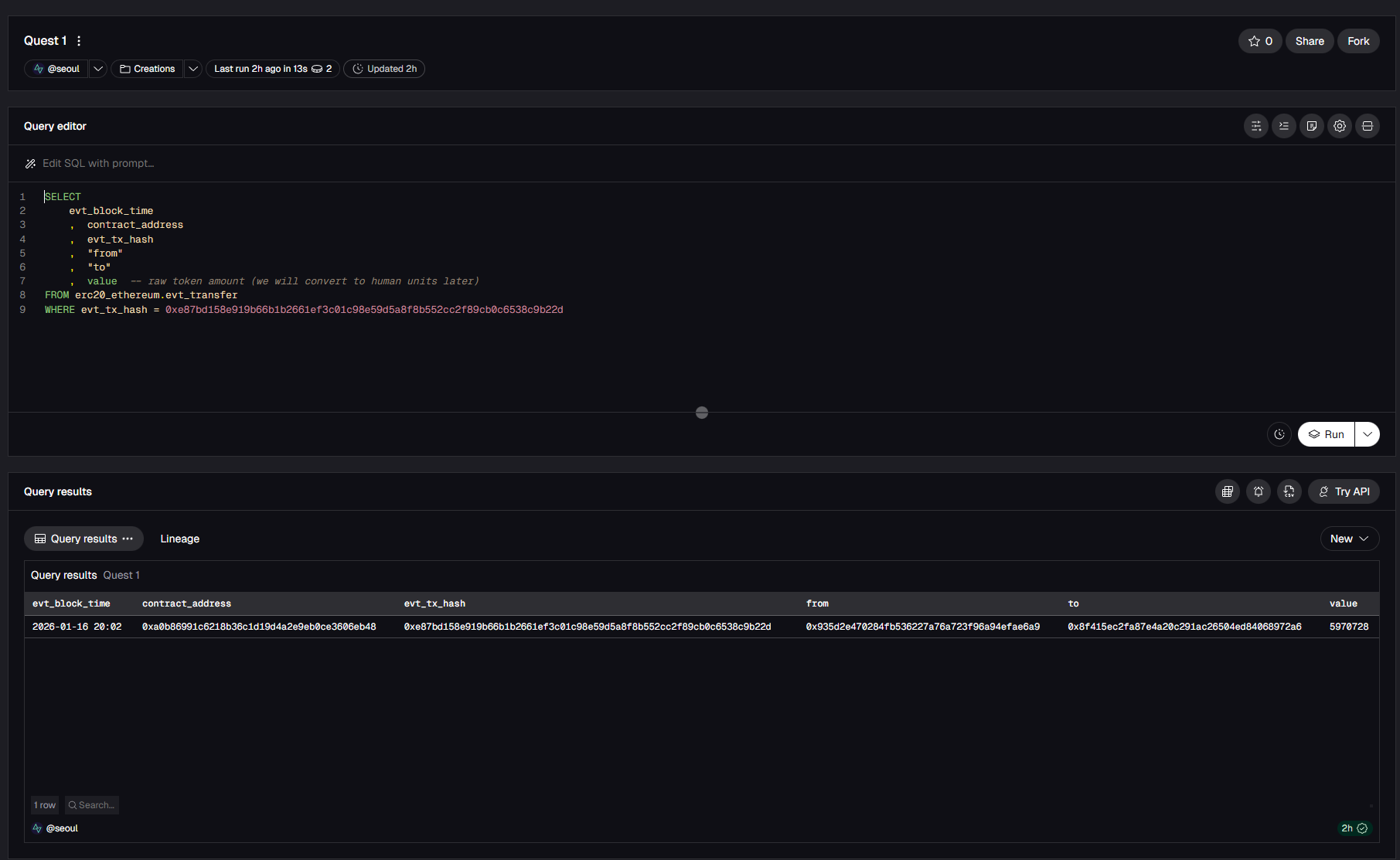
Paste this simple query into the editor:
evt_block_time
, contract_address
, evt_tx_hash
, "from"
, "to"
, value -- raw token amount (we will convert to human units later)
FROM erc20_ethereum.evt_transfer
WHERE evt_tx_hash = 0xe87bd158e919b66b1b2661ef3c01c98e59d5a8f8b552cc2f89cb0c6538c9b22d
Click Run
Result
Plain-Language Translation
Now let’s break it down and read the query as a sentence:
SELECT
evt_block_time,contract_address,tx_hash, etc“Show me these columns”
FROM
erc20_ethereum.evt_transfer“Look in the ERC-20 token transfers table.”
WHERE evt_tx_hash = 0x3dfa75b4.......84a216
“Show only rows for this specific transaction.”
Altogether: “Show me these columns from the ERC-20 transfers table, but only for the transaction with this specific hash”
Note: The words “from” and “to” are in quotes because they are special terms in SQL (the language you are writing in). To avoid conflicts with SQL commands, column names that match these keywords must be quoted.
What Each Column Means
evt_block_time: Timestamp showing when the transaction occurred
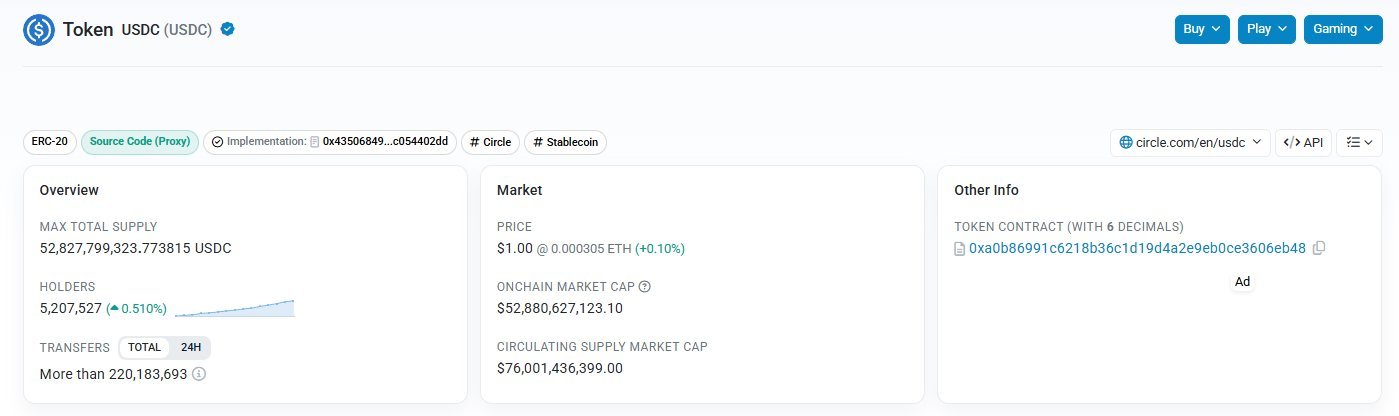
contract_address: The smart contract address (e.g., USDC contract)**
evt_tx_hash: Unique transaction ID (like a receipt number)
from / to: Wallet addresses of sender and recipient
value: Raw token amount in base units (often a very large number). We will convert this into human-readable units later
**Note: On Ethereum, there are many smart contract addresses that represent very different functions and entities (vaults, transactions, etc). In this context, you specifically need the token's own contract address (for example, the official USDC contract on Etherscan), or your query will show the wrong token or no results.
Common Pitfalls and Quick fixes
No results? Check that the transaction hash starts with
0xand is complete.Multiple rows? A single transaction can trigger several ERC-20 transfers. That's completely normal.
Query error? Check that all quotes, commas, and syntax are copied correctly
No CEX transfers? Internal transfers inside centralized exchanges (CEX) such as Coinbase or Kraken are recorded off-chain, so those transactions will not appear in onchain query results
Now that you have inspected a single transaction in detail, you will use the same pattern to find all USDC transfers into a specific wallet.
Quest 1: Find Your First Token Transfers
⏱️ Estimated Time: 5-10 minutes
Goal: Find all USDC transfers into a specific wallet
What to do
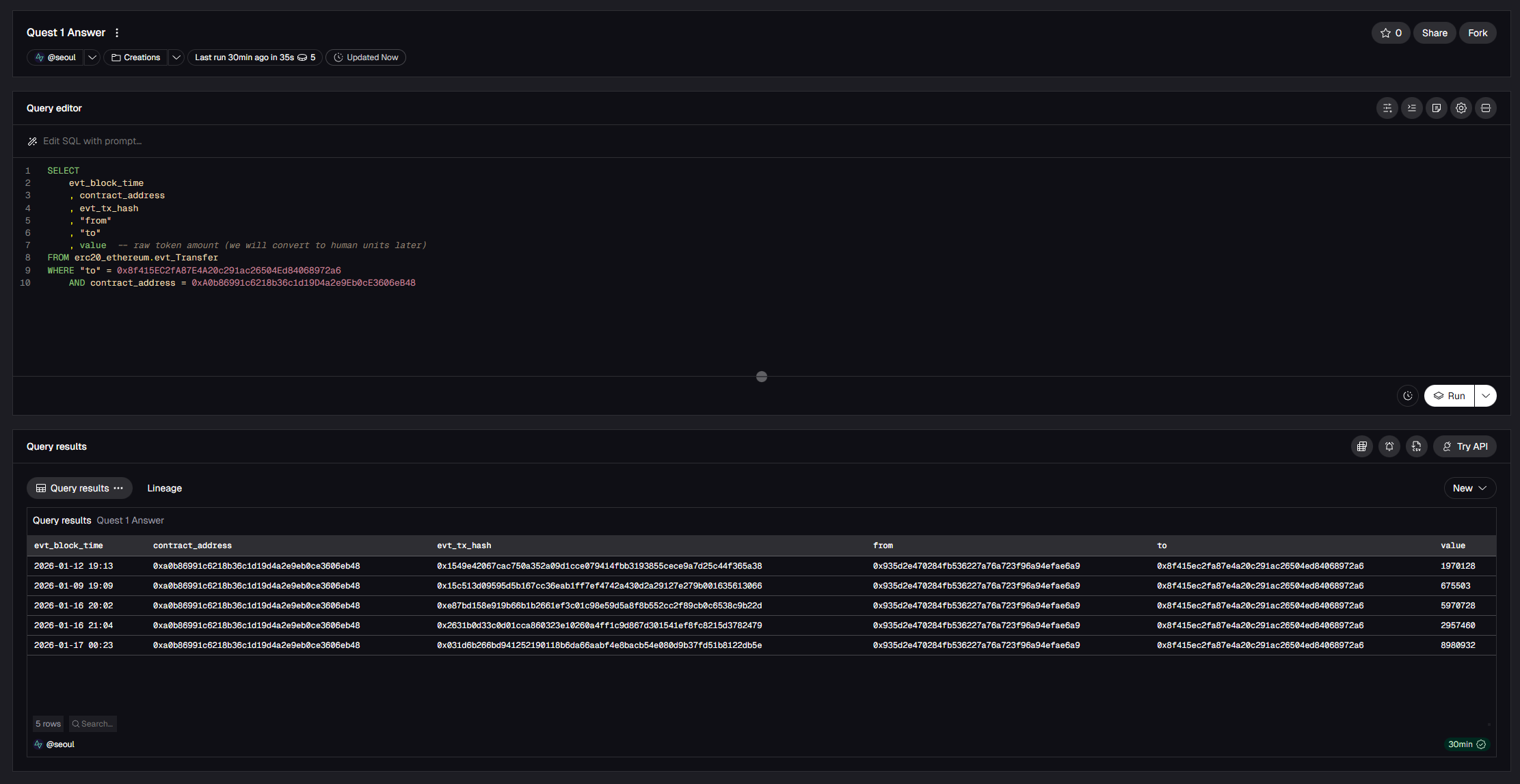
Use this wallet address: 0x8f415EC2fA87E4A20c291ac26504Ed84068972a6.
Modify the lesson’s query to show transfers where "to" equals this wallet and limit results to only USDC transfers.
Run it!
Hint: Your WHERE clause should look like this:
AND contract_address = 0xA0b86991c6218b36c1d19D4a2e9Eb0cE3606eB48 -- USDC contract
What to submit
Screenshot of your query + results
One sentence explaining what your query does (e.g. "This query shows all USDC transfers to wallet 0x8f415...")
Tag @SeoulDataLabs on X with your Quest 1 screenshot and summary
Feel free to reach out to me if you have any questions!
That's a wrap on Lesson 1. Can't wait to see your Quest 1 results!
Sample answer
evt_block_time
, contract_address
, evt_tx_hash
, "from"
, "to"
, value -- raw token amount (we will convert to human units later)
FROM erc20_ethereum.evt_Transfer
WHERE "to" = 0x8f415EC2fA87E4A20c291ac26504Ed84068972a6
AND contract_address = 0xA0b86991c6218b36c1d19D4a2e9Eb0cE3606eB48
What’s next?
Have a topic you'd like me to cover or a question? Reach out on Telegram or X (@SeoulDataLabs)
Found this helpful? Follow @SeoulDataLabs on X for new lessons and crypto data analysis
Source: @SeoulDataLabs